
How to Build Your Home Studio
Modern technology and digital audio have allowed artists, producers and engineers to create music, collaborate and make records from anywhere in the world, with quality previously only possible in studio environments. Now, with a simple laptop, one can write music, orchestrate it, mix it and deliver it to the streaming platforms. While this is true, there are some elements that anyone creating a music production environment needs to build a home studio.
In this article, we will help you build your own home studio and give you recommendations on where to invest depending on what you want to do in it.
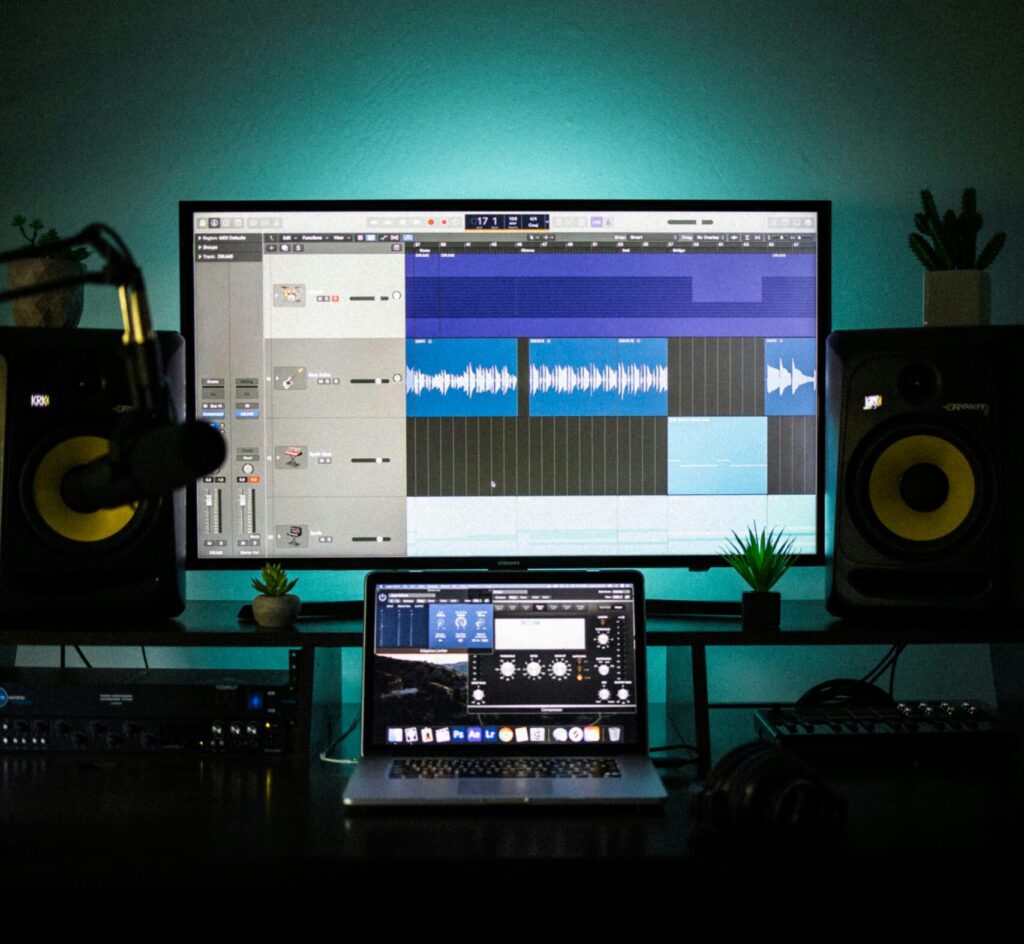
What is your home studio for?
The first question you need to ask yourself when building a home studio is what are you going to do in it. Are you going to write songs? Produce music? Compose for film? Mixing and mastering? A bit of everything? Do you have a space to play sound on speakers or are you going to be working mainly on headphones? Depending on your answers you would want to focus on one type of setup or another.
There is no right or wrong answer, and most likely as time passes, you will realise the needs change. So one piece of advice would be trying to keep your setup flexible, so if you need to expand or adapt to different conditions, your setup will do the same.
Having said that, there is one element that you would probably need regardless of your goals: a computer.
What computer should I buy?
The answer is simple: the one you can afford. If you are reading this, you probably already own one, and it should be enough to get you started on your journey. PC or Mac doesn’t really matter since every modern computer is capable of handling audio recording and plugin processing. Just make sure you have 8 or more gigs of RAM memory to handle plugins and virtual instruments without hiccups.
If you don’t have a computer but you own a tablet or phone, nowadays it is possible to work from them as well. You would be surprised by what can be created with an iPad.
Choose your DAW
But on top of the computer, you need a digital audio workstation, or DAW. This is software that allows you to record, mix, and produce music on a computer. There are DAWs for all budgets, from the free GarageBand to Logic, Ableton Live, and the industry-standard Pro Tools, which offers its own entry-level free version: Pro Tools Intro.
But whether you choose to work on GarageBand, Reaper, Logic Pro, or Pro Tools, the most important thing is to make sure you know your software in and out. If you master your DAW, your workflow will be fast, and you won’t get caught up in the technicalities when you are creating.
Ah! And don’t be fooled into choosing your DAW based on how it sounds. They all sound the same.
DAW or DAW-less home STUDIO recording workflow
As we mentioned, a computer is a basic component when building a home studio, but it is not a requirement. If you feel your creativity is choked by the computer screen and the DAW, and you are planning to play real instruments, capture performances with microphones and leave the editing behind or to send the recorded material to others, maybe a computer-free setup is for you. There are multi-track recorders or consoles, like the Tascam Model 12, capable of capturing your music with great quality and providing a more tactile experience.
Selecting an Audio Interface
The second component in your setup is an audio interface. These are devices dedicated to turning your analogue audio signals from your microphones and instruments into digital data, and the audio files from the computer into sound. Look at it as the translator between real sound and computer information. The better it is, the more accurately the audio is captured and played back.
Modern digital audio hardware manufacturers like Universal Audio or Antelope offer high-quality devices for recording and producing at different price tags. They provide accurate audio to digital and digital to audio converters and even digital processing built in, allowing users to emulate classic analogue gear straight from their device.
The main thing you should look at when choosing an audio interface is its inputs and outputs. If you plan to make music mainly using software and record with one or two microphones, a small interface with MIDI capabilities would be enough. If your goal is to record a whole drum kit with multiple microphones, you would probably want something with more input counts. Also, consider expandability to increase flexibility and adaptability in the future.
Headphones or monitors?
We have a computer and an interface; now we need something to listen to our music. But the eternal question is, can I work on headphones, or do I need speakers? And the answer is that it depends.
If you work on the go, record on location, or you don’t have the space to place speakers, investing in a good set of headphones might be the best option. Open-back headphones like the Sennheiser HD 600 are great, but if you want something more budget-friendly, the AKG K 240 or Sony MDR-7506 can be a good option (if they are good enough for Andrew Scheps, they are good enough for anyone).
On the other hand, if you have a dedicated home studio, getting a pair of trustworthy monitors might be best for listening to mixes with clients and artists, and for getting an idea of how things sound outside the headphone world. Just bear in mind that the moment we start working with speakers, it might be worth considering room treatment to address acoustic issues.
The most important thing, whether you work on headphones or monitors, is to understand how they sound. Listen to reference tracks and professional mixes, and compare them with your own work. That way, you will understand how they perform and make better decisions when working on them.
Keyboard or MIDI device
Even if you only plan to record bands with microphones, having a MIDI keyboard or device is very handy. MIDI programming is almost ubiquitous in modern productions, and having a small USB MIDI device lying around can be super helpful for writing ideas, adding textures, or getting a tactile response over your plugins and virtual instruments.
It doesn’t need to be super fancy. Just pick something that adapts to your needs and does the job.
How many microphones should I get?
This question is important but very easy to answer. Start with one. Get the best microphone you can afford and learn it in and out. Record everything with it and identify what its strengths and weaknesses are. Then, as your needs change, you can start considering more options.
Microphones are an engineer’s colour palette. Each one will give you a tone and a texture. Starting with one is always easy, but eventually you will want to experiment with more and listen to how they sound. You can read a previous blog post where we discussed different microphone techniques to record a drum kit.
Regardless of what you want to do in your studio, having at least one microphone is always a good choice. Keeping in mind the afford mentioned flexibility, you can consider a multipattern condenser microphone like the Sontronics Orpheus or Aston Spirit, to have more recording options. But if a dynamic cardioid microphone like an SM7B, Sontronics Solo or SM-57 is what you can afford, just go for it.
The devil is in the details
Finally, we need to consider the small things that make our home studio workable: cables, connectors, table, chairs and lights.
- Cables and connectors are sometimes overlooked, but very necessary in order to make your studio work. Think about how you are connecting microphones, keyboards, monitors, and interfaces, and always add a couple of spares in case one breaks.
- Your studio needs to be comfortable, so a nice chair and table are something to consider. If you plan to have people working with you, consider a second chair or a comfortable couch to hang out.
- Lights can help set the mood, inspire and help you focus on your work, so think about them as an important element in your studio.
Final Thoughts: minimum home studio setup
Building a home studio can seem overwhelming at first, but if we start by considering what we want to do in it, it’s easy to identify what we need. In this article, we have outlined the main elements you need to identify and incorporate to create a flexible studio that adapts to your needs. If there is a minimum setup to work with, it would be a laptop, an interface, a set of headphones, and a microphone in case you want to record something. From there, it’s all about considering your goals and how you want to work.
At our Advanced Diploma in Music Production and Sound Engineering, we help you understand the needs of a modern music production space and how to adapt to different setups to get the most out of them.
